Showing posts with label Hotspot. Show all posts

Sunday, February 17, 2013

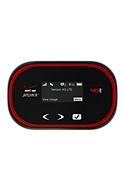
Verizon MiFi and Jetpacks 4G LTE connect up to 10 devices

I have an older Verizon MiFi that connects only 5 devices. The Wi-Fi hotspot is capable of 4G LTE, but it's an older version (MiFi 4510L). It still works fine, so I'm not upgrading anytime soon.

The newer Verizon 4G LTE hotspots are capable of connecting up to 10 devices. So, if you're traveling with friends, family, or co-workers, you can get your tablets and laptops online through a single hotspot.

Here are 3 of their current models:
  • Verizon Jetpack™ 4G LTE Mobile Hotspot MiFi® 5510L
  • Verizon Jetpack™ 4G LTE Mobile Hotspot MiFi® 4620LE
  • Verizon Jetpack™ 4G LTE Mobile Hotspot 890L

Wednesday, July 27, 2011

Force your MiFi 4510L Mobile Hotspot into 3G (EVDO) or 4G (LTE) mode (WWAN Settings)

The other day, I wrote about how my Verizon MiFi 4510L Mobile Hotspot was stuck on 3G (EVDO) and was not switching to 4G (LTE). If you're experiencing similar issues, make sure to read this.

For those of you wanting to manually switch your Wi-Fi Mobile Hotspot from 3G to 4G (or vice versa), here's a simple tutorial that outlines the steps that will help you do that.

  • Connect to your MiFi
  • Log in to your MiFi by typing this URL into your browser: http://192.168.1.1/
  • Click on "Setup Wizard"
  • The default password is "admin" (unless you've changed it)
  • When it asks you to set up a new password, click "cancel"
  • Now you'll see that you have several new menu options at the top red horizontal navigation bar: Home, Wi-Fi, LAN, WWAN, Security, Advanced

Monday, July 25, 2011

Verizon MiFi 4510L Mobile Hotspot on 3G (EVDO) & not switching to 4G (LTE)? Here's a solution.

I have a Verizon MiFi 4510L Mobile Hotspot and recently I experienced the issue where my device was stuck on 3G (EVDO) and was not switching to 4G (LTE) even though I knew that 4G service was available. The device indicator light was blinking purple/violet instead of green. This is apparently a known problem for this device. So, if your device isn't switching to 4G, it's not defective. Resetting the device won't do anything.

Here's how I got it back to 4G (LTE):

  • Connect to your MiFi
  • Log in to your MiFi by typing this URL into your browser: http://192.168.1.1/
  • Click on "Setup Wizard"
  • The default password is "admin" (unless you've changed it)
  • When it asks you to set up a new password, click "cancel"
  • Now you'll see that you have several new menu options at the top red horizontal navigation bar: Home, Wi-Fi, LAN, WWAN, Security, Advanced

Now, you'll want to click on WWAN -> and then go to the "WWAN Settings" at the bottom of the page.
  • Under the WWAN Preferred Mode, select "LTE only"
  • Then, click "apply" and the device will reboot.
My understanding is that this is a temporary fix. Therefore, you may need to do this periodically if you move into areas where you only have 3G coverage. The MiFi could have a tendency to get "stuck" in 3G mode and it needs to manually get moved back to 4G using the steps outlined above. 

Tuesday, April 19, 2011

Verizon MiFi 4510L 4G LTE Mobile Hotspot

The first 4G Mobile Hotspot on the Verizon network is the MiFi 4510L 4G LTE Mobile Hotspot.

4G is up to 10X Faster than 3G!

Features
  • 4G LTE Mobile Broadband and Mobile Broadband capable
  • LTE: Typical download speeds of 5–12 Mbps and upload speeds of 2–5 Mbps.
  • Connect up to 5 Wi–Fi® enabled devices at one time
  • MiFi 4510L does NOT support VZAccess® Manager
  • Chipset: MDM9600
  • 4G SIM Card compatible
  • Slim, Compact size
  • Integrated External Status Display
  • User–Friendly Web UI: No Software to install
  • High performance internal antenna
  • Multi–color service state LED
  • External Antenna Connector (External antenna sold separately)
  • VPN Capability
  • Auto–Connect
  • Global Data roaming is set to ON by default

Battery Times: Usage–Up to 5hrs.

Wednesday, April 13, 2011

T-Mobile 4G Mobile Hotspot now in stores

You can now get the T-Mobile 4G Mobile Hotspot in stores. 

Create your own personal hotspot on the go with the T-Mobile 4G Mobile Hotspot—get high-speed Internet on up to five Wi-Fi devices, using a single mobile broadband connection.

• High-speed Internet for up to 5 Wi-Fi devices (gaming consoles, laptops, more)
•Compact & light weight for easy portability
• 4G-capable for blazing-fast speeds on America’s Largest 4G Network™

T-Mobile’s HSPA+ 4G network not available everywhere.

Thursday, March 10, 2011

Which MiFi would you get?

I need to purchase a mobile WiFi hotspot. Which one should I get? I currently use my Droid X as a 3G Mobile Hotspot and it works fine, but I now need a dedicated WiFi hotspot.

Here are some of the ones I'm currently considering:
  • Sprint Overdrive™ 3G/4G Mobile Hotspot by Sierra Wireless
  • Verizon MiFi™2200 Intelligent Mobile Hotspot
  • Verizon Wireless Fivespot™ Global Ready™ 3G Mobile Hotspot
  • AT&T Mobile Hotspot MiFi® 2372
Then again, I should probably wait until 4G rolls out everywhere. I also need some clarification as to whether you can use these different MiFi models when it's plugged into a power source. Some online forums appear to report that the WiFi stops if you plug the MiFi into a microUSB power supply. I think I'll have to run my own experiments so that I can find a way around that issue.

Friday, March 04, 2011

Problems with the Droid X 3G Mobile Hotspot: dropped connections

For the past few months, I've been using my Motorola Droid X as a 3G Mobile Hotspot. Most of the time, this feature works fairly well. However, I've recently started experiencing more problems. Specifically:
  • It drops a connection and the 3G Mobile Hotspot service stops
  • It freezes up and I lose access to the Internet even though the 3G Mobile Hotspot service is still running
I've tried resetting my phone and experimenting with various settings, but nothing seems to fix these intermittent problems. I've tried the following steps outlined on the Verizon user forums, but I don't want to go through this process every time I use my Droid X as a Mobile Hotspot:
Step. 1 - Ensure WiFi is disabled. (instruction below)
http://search.vzw.com/?do=viewdoc&id=33719&p=null

Step. 2 - Try switching the hotspot channel (Step 6 in the article under channel)
***To access settings, 3G Mobile Hotspot must be disabled (Off).
http://search.vzw.com/?do=viewdoc&id=33761

Step. 3 - Try changing the encryption
http://search.vzw.com/?do=viewdoc&id=33761 (Step 6 in the article under security)

Step. 4 - Try relocating the device. (Something in the immediate location could be affecting the service received)

Step. 5 - Soft reset (power off the device, pull the battery out for 20 seconds and place it back in)
I'm wondering if people who own a MiFi are experiencing similar issues. Perhaps a dedicated Mobile Hotspot like a MiFi is a better option than using my smartphone. Maybe it's time to upgrade to a 4G device. When's the 4G MiFi 4510L coming to Verizon? When's the HTC ThunderBolt 4G smartphone arriving? Maybe I should just get a 4G MiFi from Sprint now.

Tuesday, February 08, 2011

Battery life when using my Droid X as a 3G Wi-Fi Mobile Hotspot

The Droid X and many other smartphones are capable of turning themselves into 3G Wi-Fi Mobile Hotspots that allow you to connect up to 5 mobile devices. When you enable this feature, you'll get a notice reminding you that this feature will drain your battery very quickly, so you should plug your phone to a power source.

A few weeks ago, I was using my Droid X every day as my personal hotspot. I was using an external battery pack, so I had the ability to recharge my battery during the middle of the day. If I didn't have that battery pack, my phone would have died by noon.

The 3G mobile hotspot on the Droid X is a great feature, but it would be nice to see a higher level of battery efficiency in these devices. The MiFi 2200 is rated to 4r hrs and the Fivespot Global Ready 3G hotspot lasts 5 hrs, so those devices aren't great either unless you're carrying a separate battery pack.

Monday, January 31, 2011

Speed differences: Verizon USB tethering vs. 3G Wi-Fi Mobile Hotspot

I have a Motorola Droid X and I've been using the 3G Wi-Fi mobile hotspot feature so that I can get online with my laptop and my iPad. In the past, I used to tether using the USB cable.

Well, I did a speed test because I was convinced that 3G Wi-Fi Mobile Hotspot was slower than USB tethering. Sure enough, with 3G Wi-Fi Mobile Hotspot, I was experiencing download speeds of 0.5 Mbps. With USB tethering, the speeds were almost 3x faster! 1.3 Mbps.

Are you experiencing similar results?

Saturday, January 22, 2011

Using my Droid X as a 3G Mobile Hotspot for my iPad

Since I'm on the Verizon Network, I got an iPad that only has Wi-Fi access. Fortunately, I can use my Motorola Droid X as a 3G Mobile Hotspot so that I can get online with my iPad when I'm out and about. It's a great feature and it allows me to use my iPad without a separate 3G hotspot like the MiFi 2200 Mobile Hotspot.

I'll probably need to invest in an extended battery for my Droid X if I plan to use it as a 3G Mobile Hotspot for extended periods of time. Tethering via Wi-Fi will drain your battery quickly!

To use your Droid X as a 3G Mobile Hotspot, click on the green icon that says "3G Mobile Hotspot" and make sure that you have this feature enabled on your service plan.  It's an extra $20/month.