
Showing posts with label UpToDate. Show all posts
Showing posts with label UpToDate. Show all posts
Wednesday, November 28, 2012
UpToDate Offline Content for Android now available
If you use UpToDate on a regular basis, you probably know that you can access the mobile web-optimized version on your smartphone or tablet. UpToDate MobileComplete is the offline version of UpToDate and it's the fastest version (plus you'll save on your data plan usage). It's been available for iOS for a while now, and it's finally available for Android. Upgrading to UpToDate MobileComplete is an additional $49 per year.


Tuesday, June 12, 2012
UpToDate® for Android™
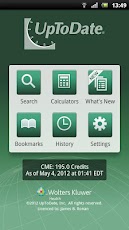 UpToDate has launched their mobile App for Android™ phones and tablets! This free app provides:
- Anywhere access to full UpToDate clinical content
- Optimized user interface designed especially for Android phones and tablets
- Persistent log-in and suggested search terms to help you get answers faster
- Ability to earn CME
Wednesday, November 30, 2011
Offline UpToDate MobileComplete for iPhone
I received the following email regarding UpToDate MobileComplete, the fastest mobile version of UpToDate:
Clinical answers. Stat!
UpToDate MobileComplete lets you download UpToDate’s clinical content locally to your iPhone and iPad. Upgrade to the offline version of UpToDate and
Clinical answers. Stat!
UpToDate MobileComplete lets you download UpToDate’s clinical content locally to your iPhone and iPad. Upgrade to the offline version of UpToDate and
- Get the fastest version of UpToDate on iPhone and iPad available.
- Use UpToDate without an Internet connection1 — even in dead zones!
- Reduce data usage if you have a limited data plan.
Wednesday, September 07, 2011
UpToDate® for iPhone® now available
UpToDate for iPhone is now available in the United States.
This new App, which you can download FREE from the App Store or through iTunes®, allows individual subscribers to access UpToDate content quickly and easily on an iPhone, iPod® touch or iPad® over Wifi or a 3G connection.
The offline version of UpToDate for iPhone (content will reside entirely on your device) is coming soon. The current version is not optimized for the large screen of an iPad, but that's coming soon as well.
So, when's the Android version of UpToDate coming?
This new App, which you can download FREE from the App Store or through iTunes®, allows individual subscribers to access UpToDate content quickly and easily on an iPhone, iPod® touch or iPad® over Wifi or a 3G connection.
The offline version of UpToDate for iPhone (content will reside entirely on your device) is coming soon. The current version is not optimized for the large screen of an iPad, but that's coming soon as well.
So, when's the Android version of UpToDate coming?
Wednesday, September 15, 2010
The most-desired medical app for Android is...
The most-desired medical app for Android is UpToDate. The second most-desired medical app is Medscape. These are the apps that Android users are looking for. They're looking for UpToDate and Medscape for Android, but they're not finding these apps because these apps aren't out there yet.
You can access UpToDate on any mobile device browser. That works quite well. I've even blogged about accessing UpToDate on Android.
Medscape Mobile for Android should be coming soon... (not exactly sure when, but it should be soon)
You can access UpToDate on any mobile device browser. That works quite well. I've even blogged about accessing UpToDate on Android.
Medscape Mobile for Android should be coming soon... (not exactly sure when, but it should be soon)
Friday, August 20, 2010
UpToDate on Android
 It looks like there are many Android smartphone users who are looking for an UpToDate app. Unfortunately, UpToDate doesn't have an app for Android. They don't have an app for iPhone or BlackBerry either. Why? It's because you can access UpToDate via your mobile web browser. The site renders well on your mobile device after you log in.
You can also try typing: http://mobile.uptodate.com
This is what UpToDate has to say about online access via mobile device:
Your web-enabled mobile device may be able to access UpToDate online at http://mobile.uptodate.com if your device supports HTML, cookies, and JavaScript. Not all devices or services are validated or supported.
Here's what UpToDate has to say about iPhone and BlackBerry:
Can I access UpToDate from my iPhone or BlackBerry?
You can log in to UpToDate online using the Safari browser on your iPhone or the browser on your BlackBerry by going to the login page at http://mobile.uptodate.com. In addition, you can earn CME/CE credit through your use of UpToDate on your iPhone or BlackBerry. An installed version is not currently available for these devices.
What about an institution license?
Can I access UpToDate online on my mobile device through my institution's site license?
If your institution has an UpToDate site license, you can access UpToDate online through a WIFI connection to the institution's system. Contact your institution's system administrator for instructions.
Speaking of licensing, here are the details around Individual Subscriptions:
* Best option for clinicians
* Online access anytime, anywhere
* DVD for installation on a computer and some mobile devices
* CME/CE credit available
1 year $395 $1.08 / day
2 years $690 $0.95 / day
3 years $999 $0.91 / day
On my Android device, the UpToDate URL after I log in is:
http://www.uptodate.com/online/content/search.do
Do you access UpToDate on your smartphone?
Friday, July 23, 2010
UpToDate for Android, iPhone, BlackBerry, or webOS
Do you use UpToDate? You won't find a native app for UpToDate if you're using an Android smartphone (or iPhone, or BlackBerry, or webOS), but you can create a bookmark on your mobile web browser to: www.uptodate.com and then simply log in and access UpToDate on your mobile device. UpToDate is an evidence-based, peer-reviewed information resource available via the Web, desktop/laptop computer and mobile device.
Back in the "old days," we used to run UpToDate on devices running Windows Mobile or Palm OS. Now, you can access UpToDate on any mobile web browser using almost any modern smartphone. So, whether you're a fan of Android, iPhone, BlackBerry, or webOS, you can access UpToDate. Waiting for Windows Phone 7 to come out? I don't think the native Windows Mobile UpToDate app will run on Windows Phone 7, so you'll need to use the mobile web browser to access UpToDate. So, whether you're a fan of Android, iPhone, BlackBerry, or webOS phone service, you can access UpToDate.
Tuesday, April 06, 2010
CME on your smartphone
 There are several ways to get CME (continuing medical education) credit by using your smartphone. Several years ago, there were only a handful of options. Today, there are many more ways to get CME on your smartphone.
Here are some examples of medical apps, medical websites, and other smartphone resources that will allow you to participate in CME activities on your smartphone:
- Epocrates Mobile CME
- Real CME
- ReachMD
- Medscape
- Skyscape CME Stat
- QuantiaMD
- MedPageToday (mobile website)
- UpToDate (point of care CME)
- XtraCredit
Saturday, March 06, 2010
Top 5 Android Medical Apps
 If you're using an Android smartphone, then you've probably discovered that the list of professional medical apps is relatively short compared to the iPhone, Windows Mobile, and even BlackBerry. This trend will change dramatically this year as more medical app developers and publishers release medical apps for Android.
 Here's my current list of "top 5Android medical apps" (this list will probably change in a few months):
- Epocrates (now available for Android!)
- UpToDate (via mobile web browser)
- QuantiaMD (you'll have to try it. it's a great app that provides education and other resources)
- Skyscape Android Reader (plus, the entire list of books and references)
- Unbound Medicine (plus, the entire list of books and references)
- 5-Minute Clinical Consult
- Davis's Drug Guide
- Taber's Medical Dictionary
- Pocket Guide to Diagnostic Tests
Finally, please remember that this is simply my personal "top 5" list based on my personal use experience. This list is likely to change over the next few months as apps evolve and as I try new and different apps. If you're currently developing a medical app for Android and you'd like me to review your app, please make sure to contact me.
Wednesday, December 16, 2009
How much storage do you need on your smartphone?

Right now, some smartphones like the Apple iPhone 3GS are capable of 32GB of storage. It won't be long before we see iPhones that have 64GB of space. How much do we really need?
At one time, I remember experiencing tremendous frustration because my medical apps (which are typically quite large) would not fit on my smartphone. I'd run out of internal memory (RAM) and I didn't always have the option to install an app on a memory card. Now, today's smartphones are coming with much more internal memory, but some obviously have much more than others. Even if you choose to store an entire medical encyclopedia (like UpToDate) on your smartphone, you won't be using much more beyond 1 or 2 GB.
Now that we have smartphones that have 32GB of storage space, you can easily store MP3 files, videos, and many other forms of multimedia on your device. It's great, isn't it? When's the last time you got an "out of memory" alert on your smartphone?
It's a shame that Windows Mobile smartphones still don't have much internal memory. My current HTC Touch Pro2 has 512MB of Flash Memory and 288MB of RAM. I find that it really confuses many people when you describe memory using those terms. The HTC Imagio has similar specs. The Samsung Omnia II has 512 Flash/208 RAM (+ 8GB of internal user memory), so that's a little bit better.
What if we look at Android? The Motorola Droid has 512MB of ROM and 256MB of RAM. The HTC Droid Eris has ROM: 512MB, RAM: 288MB DDR. It comes with an 8GB microSD card and it supports up to 16GB.
What about BlackBerry? Well, the BlackBerry Storm2 9550 has 256MB Flash Memory, 256MB RAM, 2GB On–board memory. That's an improvement over the original Storm 9530, but it's still nowhere near Apple's iPhone.
So when will other smartphone manufacturers catch up with Apple when it comes to internal storage space?
Tuesday, December 08, 2009
Drug reference guides for Android

If you're using an Android powered smartphone (such as the Motorola Droid, the HTC Hero, HTC MyTouch, or the HTC Droid Eris), then you may be wondering when Epocrates will release drug reference software for your operating system. You can access drug information via your mobile web browser (m.epocrates.com) or you can purchase drug reference medical apps from Unbound Medicine (such as Drug Facts or Davis's Drug Guide). MobilePDR will also be available for Android in 2010 and I'm sure Epocrates will have some Android software in 2010.
If you have a subscription to UpToDate, remember that you can access that via a mobile web browser and look up drug info (powered by Lexi-Comp). Finally, you may be glad to know that Skyscape now offers an Android Reader for their titles.
Tuesday, August 25, 2009
Essential smartphone medical apps

What are the true "essential" apps (or applications) for medical students and residents? (by the time you're an attending, you shouldn't be relying on a smartphone, right?)
In some ways, I'm tempted to say, here are the essential medical software you need to survive:
- Epocrates
- Internet-enabled web browser (this way, you can look everything else up)
- Medical calculators (which are often included within Epocrates)
- If you can afford it, I would highly recommend UpToDate (web-based access is sufficient)
- the rest of this list is highly dependent on your smartphone operating system.
Finally, the list of "essentials" really depends on your level of training. If you're a 3rd year medical student on a clinical rotation, your smartphone needs are different from an intern who's expected to stay very organized and keep up with a million tasks. Your smartphone needs will evolve over time and you'll find that certain apps lose importance as you memorize one thing and rely on another. For instance, some people love the Sanford Guide while other people don't know how to use it. So my list of "essentials" is relatively short because the Internet becomes the ultimate "essential."
Saturday, July 25, 2009
Medical software for Google Android

What type of medical software can you get for smartphones running Google Android? Your options are quite limited at this point. However, Unbound Medicine has several titles that are currently available for Android. We should also see mobilePDR for Android released in early 2010. It's only a matter of time before we start seeing many other providers offering medical software for Google Android. My prediction is that we'll see Epocrates, Skyscape, and PEPID come up with software for Android. You can always get access to certain references via mobile websites. Epocrates and UpToDate both have mobile-friendly websites that can be used by almost any smartphone.
Monday, July 20, 2009
CME on a smartphone

There are several ways of getting Continuing Medical Education or CME credit using your smartphone. Allow me to list several ways (this is NOT meant to be a comprehensive list):
- Mobile CME via Epocrates
- Skyscape CME STAT
- UpToDate via mobile web browser (paid subscription required)
- MedPageToday via mobile web browser
- ReachMD for Apple iPhone
Subscribe to:
Posts (Atom)