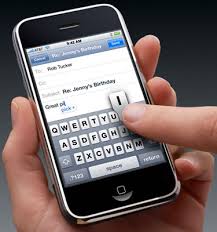
I've had my iPhone 5 for a week and today I started encountering the screen "flickering" bug when you pull up the virtual keyboard. It didn't last long and it disappeared as soon as the keyboard was gone. Is this a software or hardware bug?
The new iPhone 5 is thinner because the glass display combines the touch sensors into the glass resulting in a single layer of glass and no additional layer for touch sensors. The new in-cell touch display has been causing other types of strange screen problems which I suspect may be due to quality-control issues. In any case, I often find myself wondering if my iPhone 5 will start developing screen + touch problems over time.
Have you experienced the screen flickering bug on your iPhone?
Showing posts with label touch screen. Show all posts
Friday, October 12, 2012
iPhone 5 screen flickering "bug"
Monday, December 06, 2010
Motorola Droid Pro - the Android smartphone for ex-BlackBerry and Treo users
I went to the Verizon store the other day and I played with the Droid Pro. I admit that I was more impressed than I thought I'd be. In fact, if I had to buy a new smartphone today, I'd probably get the Droid Pro. I currently use the Droid X and I like it, but it would be nice to have a QWERTY keyboard that I could use while the phone is in portrait mode. I rarely rotate the phone to use the on-screen keyboard in landscape mode. I think I developed most of my smartphone habits with one of my first smartphones: the Palm Treo. In many ways, the Droid Pro reminds me of a slim version of the Palm Treo.
Well, I'm not planning on selling my Droid X to get a Droid Pro. However, I will recommend the Droid Pro to those who are familiar with BlackBerry or the old Palm Treo. The Droid Pro is nice and slim and it's a World Phone for those of you who travel internationally. It's built like a pure business phone, but you'll still find some great multimedia features plus a 5 MP camera with a dual-LED flash.
Wednesday, October 13, 2010
A touch screen with "texture" so you can "feel" each icon
Imagine if you could "feel" each icon on your smartphone screen. You'll be impressed by the technology that's currently in the pipeline. Will this type of technology improve on-screen typing? What if you could "feel" each key on that on-screen keyboard?
Here's a video showing that Nokia has developed a prototype of its N900 smartphone that lets you feel the texture of icons on the screen – a technology that would add a whole new dimension to touchscreen apps.
Wednesday, February 03, 2010
Windows Mobile 6.5.3 (not kidding)
- Windows Mobile 6
- Windows Mobile 6.1
- Windows Mobile 6.5
- Windows Mobile 6.5.3
Windows Mobile 6.5.3 will offer more touch-friendly features and will also allow users to leverage a capacitive touch screen (if you device has a capacitive screen). Plus, support for multi-touch gestures will be included. Let's hope that also includes "pinch to zoom." Most of the older smartphones use a resistive touch screen plus a stylus. I think the days of the toothpick stylus are gone. As smartphones use resistive touch screens and rely on finger-touch, we won't be using stylus pens anymore.
The first Windows smartphone running 6.5.3 will be the Sony Ericsson Aspen. You can expect to see larger buttons, a modified user interface, a magnify feature, an improved version of Internet Explorer, and several other new features.
Sunday, January 03, 2010
Swype for Android
Swype provides a faster and easier way to input text on any screen. With one continuous finger or stylus motion across the screen keyboard, the patented technology enables users to input words faster and easier than other data input methods—at over 50 words per minute. The application is designed to work across a variety of devices such as phones, tablets, game consoles, kiosks, televisions, virtual screens and more.Swype comes on the Samsung Omnia II running Windows Mobile 6.5, but there's a preview version out there for Android. You can learn more about that preview here.
Wednesday, December 23, 2009
2010: Android vs. iPhone
As a result, you have many hardware options if you choose Android. If you want a thin touch-screen phone, you've got that in the HTC Droid Eris, the T-Mobile myTouch, or the HTC Hero. If you want a hardware QWERTY keyboard, you can get that with the Motorola Droid or some of the newer HTC smartphones.
Apple will always have a loyal base of users, but many non-Mac users will easily make the switch from iPhone to Android if they don't need to switch wireless carriers and if they have Windows-based PCs at home and at work. I know that many physicians love their Macs, but they're stuck with Windows-based PCs at work to run their Electronic Health Records (EHRs) or Electronic Medical Records (EMRs). Right now, several EHR vendors have developed iPhone apps for their system, but it's only a matter of time before we see some Android solutions as well.
Android will be used on mobile devices beyond the smartphone, so it will quickly become a ubiquitous mobile operating system. Apple may come out with a tablet running the iPhone OS, but that won't compete against all the laptops and mini computers that may be running Android as a complimentary OS. 2010 should be a very interesting year for Android and iPhone.
Tuesday, December 22, 2009
The future of smartphones: voice command
Current smartphones have some sophisticated voice command capabilities, but we're still in very early stages with voice recognition and voice command as this relates to smartphones. The majority of us still type our e-mails or use the buttons or touch-screen to open apps, navigate, and browse the web. Imagine what your life would be like if you could simply speak and all these things would happen.
For instance, what if you could just say: "look up drug... drug name Avastin... go to adult dosing... " and then within a few seconds you're looking at the dosing schedule for Avastin.
Sunday, December 06, 2009
Trackpad vs. Trackball (BlackBerry)
This is a popular debate among seasoned BlackBerry users: Trackpad vs. Trackball.
If you're new to BlackBerry, then you may not be familiar with the issues that are often discussed. Many users evolved from the thumb-operated scroll wheel that used to be on the side. Then, we saw the trackball appear so that you could effectively scroll in 2 different dimensions (up/down and left/right) plus diagonal if you're using an on-screen mouse. Now, the trackpad allows you the same type of functionality without any moving parts (so you don't need to worry about dust, the ball getting stuck, etc.).
At the end of the day, I think this is going to become a dead topic because we'll all be using touch-screen devices and we won't have any trackballs or trackpads. Everything will rely on capacitive touch screens that allow multi-touch gestures so that you can effectively navigate and operate your smartphone using a few fingers on one hand. The BlackBerry Storm and Storm 2 currently offer some limited multi-touch capabilities, but I'm confident that all future models will feature more multi-touch gestures and functionality.
Friday, December 04, 2009
Samsung Omnia II getting some mixed reviews?
The Samsung Omnia II launched earlier this week and I've been seeing some mixed reviews about this smartphone. Some feel that the Swype technology works well while others don't seem to care for it. Most like the AMOLED display (but you can expect poor visibility when you're outside). The software running the user interface seems to be associated with a love/hate relationship. The widgets drain your memory and may slow things down. I think I prefer the HTC interface called TouchFLO. The lack of a built-in stylus? Well, my HTC Touch Pro2 has a stylus, but I rarely use it since I'm almost always using my finger to navigate on this device. However, if you're planning on running Epocrates, plan to use a stylus (note that Epocrates does not currently run on Windows Mobile 6.5, so you'll have to wait before you can get it to run on the Samsung Omnia II).
Let's see what happens as more reviews get published over the next week.
Thursday, December 03, 2009
Smartphones of the future
10 years ago, if you would have told someone that you could squeeze 16 GB of flash memory on something the size of a microSD card, people would have laughed. Think about the type of storage technology we had 10 years ago. In 1999, we were living in the era of Windows 98 (Windows XP was released in 2001). Did you have a PC running Windows 98? Do you even remember the specs on that PC? I had an analog Motorola StarTac cell phone in 1999. I remember paying quite a premium to have that phone.
If we could move forward 10 years, what will smartphones be like? I don't think anyone will debate that mobile phones will be capable of very high data transfer speeds. They will have very fast processors. They will come with a large amount of internal flash RAM. Hopefully they will have much better battery life.
I wonder if the majority of future smartphones will be designed with touch-screen navigation or buttons. Will we still have phones with a hardware QWERTY keyboard? Or, will everything be driven by voice recognition and touch navigation? It's a bit difficult to imagine, isn't it? 10 years can go by so quickly, yet so many technology advances can occur over 10 years.
Will we have flexible LCD displays? Will phones be thinner than they are today? Will they be capable of 3D holographic projections? Will everything be video phone calls?
As we prepare for 2010, I'm reminded of the type of technology I used in 1999. As we prepared for the Y2K bug 10 years ago, life seemed slower and simpler back then. Today, we have access to information everywhere and I'm always connected to the Web (thanks to my smartphone).
I'm saving some of my relics so that I can show them to my kids. I plan to build a little gadget museum in my house so they can appreciate how technology has changed over time.
Monday, November 16, 2009
BlackBerry Bold 9700 (Bold 2) now on T-Mobile
The BlackBerry Bold 9700 (also known as the Bold 2) is now available from T-Mobile. This new device is a little bit smaller than the previous Bold, but it still lacks a touch screen. I'm waiting for RIM to release a BlackBerry model that includes a hardware QWERTY keyboard and a touch screen. What are they waiting for? Why should a touch screen and a hardware keyboard be mutually exclusive?
AT&T will also have its own version of the Bold 2. Maybe the Bold 3 will have a touch screen.
I realize that business users may not recognize the critical importance of a touch screen, but if you're working in the health care industry, then you will quickly recognize that a touch screen is invaluable because of the way many medical apps are designed. You will find that you are much more efficient using a device that has a touch screen.
Labels:
AT and T,
BlackBerry,
Bold,
keyboard,
QWERTY,
RIM,
t-mobile,
touch screen
Wednesday, October 21, 2009
Lexi-Comp for the Palm Pre (webOS) - coming soon
The software is still in development, but you can get a sense of how the medical app will run on webOS. They have screen shots and a short video. The software interface reminds me of the iPhone, and I think that's the direction we'll see things move as more smartphones rely on finger-touch input and navigation.
Sunday, October 11, 2009
Refreshed Internet Explorer Mobile (Pocket Internet Explorer)
The refreshed version of IE Mobile in Windows Mobile 6.5 is a considerable improvement than the browser found in 6.1, but I still prefer using either Skyfire or Opera Mobile. I'm eager to see Firefox Mobile (Fennec) when the final release gets out there. The refreshed version of IE Mobile allows you to zoom in and out of web pages much more effectively. Since the majority of Windows Phones use resistive touch screens (passive) as opposed to capacitive touch screens, we won't see any multi-touch gestures that allow you to zoom in and out by pinching or spreading your fingers in the current generation of Windows Phones.
So, if the one major benefit of upgrading from Windows Mobile 6.1 to 6.5 is to get the newer, more functional IE Mobile. Is that a real benefit if you're already using Skyfire or Opera Mobile?
Monday, September 21, 2009
Screen protectors on smartphones
At one time, Verizon used to ship their smartphones with screen protectors. Now, you're on your own and if you're planning on purchasing a screen protector, you can spend anywhere from $2-3 on eBay up to $20 in retail stores. (Guess where I get my screen protectors)
I wish that all smartphones came with a factory-installed screen protector. Sometimes, it's so difficult to install that protector while avoiding small bubbles under the plastic. Over the years, I've seen some novel application methods that have virtually eliminated the chance of getting bubbles.
Do you use a screen protector on your smartphone? I admit that at one time, I had screen protectors on virtually everything that had a touch screen. This includes my PDA, UMPC, tablet, etc. Now, I only use a protector on my smartphone. All my other devices are running "naked" and I've been careful enough that I haven't gotten any scratches (yet).
I wish that all smartphones came with a factory-installed screen protector. Sometimes, it's so difficult to install that protector while avoiding small bubbles under the plastic. Over the years, I've seen some novel application methods that have virtually eliminated the chance of getting bubbles.
Do you use a screen protector on your smartphone? I admit that at one time, I had screen protectors on virtually everything that had a touch screen. This includes my PDA, UMPC, tablet, etc. Now, I only use a protector on my smartphone. All my other devices are running "naked" and I've been careful enough that I haven't gotten any scratches (yet).
Tuesday, September 15, 2009
When will the Apple iPhone include a hardware keyboard?
For business users who do quite a bit of typing, it really makes sense to have a hardware keyboard. Buttons are so much easier to push than anything on a small screen. That's probably why some BlackBerry users could never imagine using the Storm (or an iPhone).
We see that Palm designed the Pre with the business user in mind. When will Apple design an iPhone that has a built-in keyboard? Will that be the next version that comes out next year? Perhaps an iPhone Pro? I think it's only a matter of time before we see something like an iPhone Pro. The big question in my mind is this: If the iPhone has a built-in keyboard (slider-version), then will the keyboard be tall and narrow (vertical), or short and wide (horizontal)?
Labels:
apple,
apple iphone,
BlackBerry,
HTC,
iphone,
keyboard,
Storm,
Touch Pro 2,
touch pro2,
touch screen
Monday, September 14, 2009
Giant display found on the HTC Leo
The HTC Leo has a huge display! It's 800x480 and it reminds me of some of the older HP iPaq PDAs that had really large screens (of course, those devices were also quite big).
The HTC Leo has a 4.3" screen which is a huge jump from the old 2.8" screen. The HTC Touch Pro2 has a 3.6" screen (which is also the same screen size found on the Apple iPhone). As we near 5 inches, phones will start to resemble the old OQO model 02 (which had a 5" screen).
Thursday, September 10, 2009
Windows Mobile 6.5 Build 23045
For those of you (like me) who may be testing Windows Mobile 6.5, consider trying Build 23045 when you get a chance. The updated operating system is becoming more finger touch friendly. This means larger icons and bigger menus for larger screens. Most of the newer Windows phones are coming with larger screens, so they can accommodate these touch-friendly features. Plus, the screen is flush with the edges of the device, so it makes it very easy to tap on the edges of the screen. Older smartphones have screens that are recessed behind plastic edges (like a photo frame), so it's a bit challenging to tap on the edges and corners with your finger.
It many ways, it feels like Microsoft is dragging their heels to release Windows Mobile 6.5. I wonder if that's because the bulk of their team is working on Windows Mobile 7.
Thursday, August 06, 2009
BlackBerry Curve 8520 is on T-Mobile
The BlackBerry Curve 8520 is now on T-Mobile. Unlike the BlackBerry Storm, the Curve does NOT have a touch screen. Therefore, navigation is limited because you can't tap on the screen. On the BlackBerry Storm, you can actually use some multi-tap gestures to increase your productivity. For instance, you can highlight an entire section by using some multi-tap gestures. If you're a healthcare professional (or student), get a smartphone that has a touch screen. It will make your life so much easier when you're actually using your device as a medical reference.
Wednesday, July 15, 2009
Medical software for the BlackBerry
There are a growing number of medical software solutions for the BlackBerry. Here's a list to get you started:
- Epocrates
- Skyscape (they offer a suite a products)
- USBMIS (Tarascon Pocket Pharmacopoeia, Sanford Guide)
- mobile MPR (Monthly Prescribing Reference)
- Unbound Medicine (like Skyscape, they offer a suite a products)
- PEPID
- Up to Date (via mobile web browser)
- QxMD
- mobilePDR (coming "back" soon)
Labels:
BlackBerry,
epocrates,
mobilePDR,
MPR,
PEPID,
QxMD,
RIM,
Skyscape,
Storm 2,
touch screen,
Unbound Medicine,
Up to Date,
USBMIS
Subscribe to:
Posts (Atom)