- New Apple iPhone. On Monday, June 7, when Steve Jobs kicks off WWDC (a conference for Apple developers), we can expect to hear about a new Apple iPhone. My guess is that it will look like the leaked iPhone that we saw circulating on the Internet a few weeks ago.
- BlackBerry Bold 9650 on Verizon. It's good to see BlackBerry adding Wi-Fi to their handsets.
- BlackBerry Bold 9800. This will be the first "slider" that includes a slide-out QWERTY keyboard and a touch screen. It could the perfect combination for those who like the STORM but need a hardware keyboard.
- T-Mobile Garminfone. If you need Garmin-style GPS navigation in your smartphone, this could be a nice option. Since it will run Android, you'll have a variety of medical apps you can install on this device.

Showing posts with label Storm. Show all posts
Showing posts with label Storm. Show all posts
Thursday, May 27, 2010
Exciting new smartphones on the horizon
Let me highlight a few new smartphones that will be appearing soon:


Friday, May 07, 2010
BlackBerry Healthcare Webinars
 Are you familiar with the Healthcare Solutions on BlackBerry? I used to have a BlackBerry Storm. It was a nice smartphone, but I needed something that had more internal memory for medical apps. The Storm 2 is a nice upgrade.
 Collaborate more effectively and improve the delivery of secure clinical information to your healthcare team by implementing the BlackBerry® solution in your organization.Here are some interesting webinars that you can now view on-demand because they're archived activities:
Delivering a SOA-Based Community Record to Caregivers Everywhere at UPMC with BlackBerry Smartphones
Details: UPMC, in conjunction with Research in Motion Limited (RIM), designer and manufacturer of the BlackBerry wireless platform, has created "dbMobile." This powerful, fun and easy-to-use application is the first of its kind to deliver an on-demand, shared community patient record to BlackBerry-using caregivers throughout UPMC's healthcare system. Enabled by the organization's interoperability platform, demand is on the rise from UPMC clinicians who are enjoying increased access to a single, comprehensive view of meaningfully organized key patient data anywhere and everywhere.
Clinical Collaboration on BlackBerry with Customer Dr. Bill Fera – University Pittsburgh Medical Centre (UPMC)
Details: The BlackBerry Healthcare Solution provides the platform for collaboration, critical alerts, and clinical applications. The result - secure and timely access to colleagues and information, which improves the safety and quality of care delivery. Hear from Dr. Bill Fera on how the patient care cycle is shortened with more resourceful communications and more real-time data for decisions – all with the BlackBerry Smartphone. Most importantly, how the quality of patient care increases while the cost of care decreases.
Clinical Collaboration on BlackBerry
Details: This webcast discusses a platform for collaboration, critical alerts, and clinical applications. Find out how you can take advantage of this healthcare solution and provide secure and timely access to colleagues and information, improving the safety and quality of care delivery.
View the BlackBerry Healthcare Webinars
Monday, March 15, 2010
More leaked info about the BlackBerry slider

Sunday, December 06, 2009
Trackpad vs. Trackball (BlackBerry)

This is a popular debate among seasoned BlackBerry users: Trackpad vs. Trackball.
If you're new to BlackBerry, then you may not be familiar with the issues that are often discussed. Many users evolved from the thumb-operated scroll wheel that used to be on the side. Then, we saw the trackball appear so that you could effectively scroll in 2 different dimensions (up/down and left/right) plus diagonal if you're using an on-screen mouse. Now, the trackpad allows you the same type of functionality without any moving parts (so you don't need to worry about dust, the ball getting stuck, etc.).
At the end of the day, I think this is going to become a dead topic because we'll all be using touch-screen devices and we won't have any trackballs or trackpads. Everything will rely on capacitive touch screens that allow multi-touch gestures so that you can effectively navigate and operate your smartphone using a few fingers on one hand. The BlackBerry Storm and Storm 2 currently offer some limited multi-touch capabilities, but I'm confident that all future models will feature more multi-touch gestures and functionality.
Thursday, October 29, 2009
The BlackBerry Storm 2 (9550) now on Verizon Wireless

The BlackBerry Storm 2 (9550) is now on sale at Verizon Wireless. You can get one for $179.99! That's not a bad price, but if you're really looking for a bargain, the original Storm is only $49.99.
The Storm 2 includes some new features that you won't find on the original Storm, such as:
- V CAST Videos
- WiFi
- More internal Flash RAM for applications
Health care professionals are getting drawn to BlackBerry. The Apple iPhone continues to dominate in health care. Many physicians abandoned the Palm OS and didn't want to switch to Sprint to get the Palm Pre running webOS. Others didn't want to switch to Windows Mobile and they didn't want to wait for an Android-powered smartphone.
My prediction is that the Storm 2 will be a hit among medical students and professionals who don't need to load too many medical apps. I'm disappointed that the Storm 2 only has 256 MB of RAM, but maybe that will be enough storage space for the average user.
Monday, October 26, 2009
Official BlackBerry OS 5.0 now available for the Storm

The official version of BlackBerry OS 5.0 is now available for the original Storm (9530). The Storm 2 will come with OS 5.0, so you don't have to worry about looking for some leaked versions floating around on the Internet.
The upgrade (or update) to OS 5.0 is free and you'll get some major improvements in web browsing (with tabs), e-mails (flags), word completion, and mapping options. Of course, there are other improvements with OS 5.0 so you'll have to give it a try.
BlackBerry OS 5.0 is also available for other devices, such as the Curve, Bold, Tour, etc. You'll have to visit the BlackBerry website to see if your device will also get the upgrade.
Visit: http://www.blackberry.com/update
Wednesday, October 21, 2009
To BlackBerry Storm 2 or not to Storm 2
There are too many to's (2's) in the title, right?"To BlackBerry Storm 2 or not to Storm 2." That's the question.
I've been following the Storm 2 for several months and I'm quite excited about this device, but I'm also cautiously optimistic.
- Will the Storm 2 have enough internal RAM for medical apps? (2 GB of storage, but how much RAM for apps?) The original Storm only had 128 MB of RAM, even though it had 1 GB of storage.
- Will it be capable of MiFi (Wi-Fi router) capabilities?
- How will the new SurePress touch screen compare to the original SurePress?
Tuesday, October 13, 2009
BlackBerry Storm 2 to be released this month

Are you waiting in line to get the updated BlackBerry Storm? I hope they increase the internal RAM so that you can install more apps. Medical apps are often quite big and you'll run out of space very quickly on the current BlackBerry Storm that only has 128 MB of Flash RAM.
Tuesday, September 15, 2009
When will the Apple iPhone include a hardware keyboard?
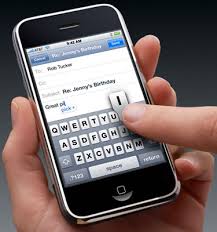 The HTC Touch Pro2 may look like an Apple iPhone from a distance, but the minute you slide out the keyboard, you know that it's not an iPhone. HTC also has an updated version of its Touch Diamond that will look like an iPhone - slim, sleek, and no hardware keyboard.
For business users who do quite a bit of typing, it really makes sense to have a hardware keyboard. Buttons are so much easier to push than anything on a small screen. That's probably why some BlackBerry users could never imagine using the Storm (or an iPhone).
We see that Palm designed the Pre with the business user in mind. When will Apple design an iPhone that has a built-in keyboard? Will that be the next version that comes out next year? Perhaps an iPhone Pro? I think it's only a matter of time before we see something like an iPhone Pro. The big question in my mind is this: If the iPhone has a built-in keyboard (slider-version), then will the keyboard be tall and narrow (vertical), or short and wide (horizontal)?
Monday, August 31, 2009
Don't use a single Epocrates account on multiple smartphones or PDAs

I recently switched smartphones. I went from an old HTC smartphone running Windows Mobile and I tried the BlackBerry Storm. Then, I switched back to my old HTC, and then I recently ordered the HTC Touch Pro running Windows Mobile. That's the phone I'm using right now.
In the midst of all this smartphone switching, I loaded Epocrates so that I could see how it runs on the BlackBerry Storm. All of this took place over several weeks and as a result, I got a note from Epocrates indicating that my account was being used on multiple devices. I quickly explained my situation and received a pleasant reply from the support folks at Epocrates.
This made me think: perhaps some medical students and residents might try to get together and "share" a single Epocrates account on multiple smartphones or PDAs (I'll refer to the iPod touch as a PDA). If you try this, you'll run into some problems. Therefore, make sure you're using your own Epocrates account on your device.
So what if you have multiple devices? I suggest you contact Epocrates support to see what they suggest. In my case, I use a Windows Mobile smartphone. I also have an Apple iPod touch, but I don't use that as a PDA. I use my iPod touch to entertain my kids during long car rides.
Epocrates is available for free, or you may wish to purchase Epocrates Rx Pro, Epocrates Essentials, or some of the other upgraded software suites they offer (may not run on all smartphones).
Friday, August 14, 2009
Haptic feedback on a smartphone touch screen

Over the last few weeks, I've had the chance to test a few devices that utilize various forms of haptic feedback when you're touching the screen to input data.
- The BlackBerry Storm uses a "clickable" screen that acts like a button (SurePress technology). You have to press down on the screen like a large button to enter most of your data. This way, you're "sure" when you're entering data.
- Several Windows Mobile devices use a tiny buzz/vibration each time you tap on the screen. This is something that is controlled via software, so you can customize it quite a bit. This feature is currently available on the Samsung Omnia and also on several HTC phones (through custom ROMs and TouchResponse over at XDA developers).
Wednesday, August 12, 2009
Do I miss the BlackBerry Storm that I had for a few days?

I don't miss the BlackBerry Storm. I tried it for a few days and I quickly realized that it wasn't the right smartphone for someone like me. Perhaps the Storm 2 will have more memory for apps. It's very misleading to advertise that you have 1 GB of storage when you only have 128 MB of "Flash" memory. Many people don't understand that you're really limited to only 128 MB of memory for apps. So, if you load some huge medical references, you'll be running out of space very quickly!
Friday, August 07, 2009
PdaNet on the BlackBerry Storm for Tethering

In the short time that I was testing the BlackBerry Storm, I also had a chance to try the June Fabrics PdaNet tethering software. Did it work? Yes. However, the current version only works on 32-bit Windows operating systems. Therefore, if you have a newer machine that runs a 64-bit OS (such as Vista or Windows 7), then you're out of luck (until they develop a 64-bit driver). Since I've been testing both 32-bit and 64-bit Windows 7 on my Lenovo Thinkpad X200 tablet PC, I was able to use BlackBerry version of PdaNet on the 32-bit version but not on the 64-bit version.
If you're a BlackBerry user, please note:
Currently version 1.20 requires OS 4.6 or above so it only works on the BlackBerry Tour, Storm or Bold phones. Please try out the software and make sure it works for you before making the purchase.I wonder what will happen with OS 5.0 comes out. I can't imagine that PdaNet will stop working, but I haven't performed any tests yet. I've been a PdaNet user for several years and I can say that the product works fairly well. I'm not tethering all the time, but when I need it, it works. I've personally used PdaNet to tether on the Palm OS, Windows Mobile, and BlackBerry. They also have PdaNet for Google Android and Apple iPhone. I imagine they'll be coming out with PdaNet for webOS sometime in the future.
How to "hard reset" the BlackBerry Storm and wipe it clean

By "hard reset," I mean: restore back to factory settings. I'm wiping my BlackBerry Storm clean so that I can send it back to Verizon. Here's how you perform a hard reset:
Go to the main menu.
Tap Options -> tap Security Options -> tap General Settings -> press the BlackBerry button (also known as the menu button) -> tap "Wipe Handheld" and check "Include 3rd Party Applications" -> tap Continue and follow the instructions by typing "blackberry" -> wait as the device resets.I removed the microSD card to erase that manually.
Yes, I've decided to send the BlackBerry Storm back to Verizon. I'm going to get a Windows Mobile phone. I have relied too heavily on the Windows Mobile OS. I have too many purchased apps and I thought I could live without them by moving to BlackBerry, but I've quickly realized that I'm destined to go back to Windows Mobile. Here are the main reasons why I decided to give up the Storm:
- A reboot time of 5 minutes and 30 seconds is not acceptable.
- Although the device has 1 GB of storage memory for media files (plus 8 GB of storage on the microSD card), it only has about 120 MB of space for apps. That's very faulty. I maxed out very quickly by installing just a few apps.
- Not enough medical apps for me. Some people can just live with using a few medical apps, but not me. I've been using medical apps on my PDA/smartphone for almost 10 years.
- I got used to typing on the screen with the on-screen keyboard, but I'm still someone who can be much more productive typing on a physical keyboard (or thumb board).
Thursday, August 06, 2009
BlackBerry Curve 8520 is on T-Mobile

The BlackBerry Curve 8520 is now on T-Mobile. Unlike the BlackBerry Storm, the Curve does NOT have a touch screen. Therefore, navigation is limited because you can't tap on the screen. On the BlackBerry Storm, you can actually use some multi-tap gestures to increase your productivity. For instance, you can highlight an entire section by using some multi-tap gestures. If you're a healthcare professional (or student), get a smartphone that has a touch screen. It will make your life so much easier when you're actually using your device as a medical reference.
Transitioning from Windows Mobile to BlackBerry

I've been a Windows Mobile user for so many years that I've learned many tips and 'secrets' about the operating system. I can be very efficient and I know which critical apps I need to be productive during the day.
One of the problems with the BlackBerry is the paucity of apps that are currently out there. Compared to Windows Mobile, the BlackBerry Storm has few apps that I depend on. However, I see that this trend is slowly changing.
The Storm is a great phone for people who need a corporate smartphone. If you're using something for work and you're mainly checking e-mails and keeping a calendar, then the BlackBerry is the optimal device. However, if you need something for work, entertainment, GPS navigation, and other personal uses, then that's where Windows Mobile has an edge.
I'm torn by indecision. Why? Because my Windows Mobile options are very limited. If I keep this Storm, will I regret that decision in several months?
Wednesday, August 05, 2009
How long does it take for your BlackBerry Storm to reboot?

How long does it take for your BlackBerry Storm to reboot? I did a simple test and timed my device rebooting. Want to take a guess?
It took roughly: 5 minutes and 30 seconds to reboot!
I couldn't believe it, so I did it again. It took the same length of time to reboot. By comparison, a reboot on my Windows Mobile smartphone takes 1 minute 10 seconds.
I'm not talking about a hard reset. I'm talking about a simple reboot that's often required when you install or uninstall a new app. You can do this either through software (QuickPull) or by physically removing the battery. The Storm doesn't have a reset button (it doesn't have a stylus, so it probably doesn't make sense to include a tiny button).
So if your phone freezes or crashes and you have to do a reset, then prepare to wait for 5 min 30 sec before your phone comes back to life. That's just not acceptable and I don't think that BlackBerry OS 5 will make any significant improvements.
I'm starting to have some more doubts about this device. I'd really like to give the BlackBerry Storm a fair chance. However, I'm used to certain things and I've been using Windows Mobile for many years. Used properly, Windows Mobile devices can lead to much more productivity. The problem I'm having is that Verizon Wireless currently doesn't have a great selection of other smartphones. There are new Windows Mobile smartphones coming out this fall, but I'm not going to pay a premium just to have those features.
Tuesday, August 04, 2009
BlackBerry Storm: my initial impressions

So the BlackBerry Storm is an old phone and it's been reviewed by many people on the Internet. However, since I recently switched from Windows Mobile to BlackBerry, I'm writing from the perspective of a former Windows Mobile user.
I've played around with the Storm extensively, but I've never used it as my personal smartphone until today. I'm not your average user who occasionally uses the browser an app here and there. I'm constantly using my smartphone for e-mail, web browsing, GPS, notes, etc.
So, here are 10 of my initial impressions after using my BlackBerry Storm for a few hours:
- I miss the ability to use a stylus. Since the Storm uses a capacitive touch screen, it has no stylus. You use your finger instead. Hence, no more drawing or scribbling notes on the screen.
- I miss having a scroll bar. When you install a new app, you often have to scroll through all the disclaimer/agreement/legal stuff and then hit "agree/accept" before you can move forward. You can sometimes bypass the scrolling by hitting the "MENU" button and then you'll see an option to accept/reject. However, this option isn't always available. If I had a scroll bar, I could simply tap my stylus and quickly scroll to the end of the page.
- I miss the ability to double tap on the word and highlight/select it. This is useful when you're trying to delete an entire word or if you're performing a copy/paste. This double tapping to highlight/select is not there on the BlackBerry.
- I miss having physical keyboard buttons. The Storm uses an on-screen keyboard. It's just not the same.
- I miss having space on the screen that isn't occupied by the large on-screen keyboard buttons. In landscape mode, the keyboard fills over 50% of the screen. You're left with a small "sliver" of a screen where you can see/navigate.
- I miss having a single button that I can click to make the on-screen keyboard appear/disappear.
- I miss having more memory for apps. Although the Storm comes with an 8 GB microSD card, you can't load apps on that card. Instead, you're only given 128 MB or RAM for your apps. I've only had my phone for a few hours and I've already filled 110 MB of that space. 18 MB left.
- I miss having the ability to edit Word/Excel files. I realize that if I purchase Documents to Go Premium, I can have this ability. But why pay for something that should be a standard feature?
- I miss the ability to close programs (vs. just minimizing them) with a single tap. By closing programs, you free up more memory. On the BlackBerry, you can still close programs, but it takes a bit more work. On Windows Mobile, you can install little free apps that make it much easier for you to close apps.
- I miss running my Windows Mobile apps. Which apps? TomTom navigator (for GPS navigation) along with medical and productivity apps. The nice thing with staying with Windows Mobile is that I don't have to repurchase the apps that I currently have. By switching to BlackBerry, I have to purchase a number of apps that I already own.
Verizon drops prices on smartphones

Just after I ordered the BlackBerry Storm, Verizon Wireless dropped the prices on several of their main Windows Mobile smartphones, including:
- HTC Touch Diamond
- HTC Touch Pro
- Samsung Omnia
Saturday, August 01, 2009
Why I didn't get the Samsung Omnia on VZW

It's time to get a new phone. I'm on Verizon Wireless, so my options are limited. I thought that I was going to get the Samsung Omnia (which is a great phone, but now the phone for me), but here are the reasons why I didn't get it:
- It's now on closeout at Verizon Wireless. This means they won't be getting any more new ones. What they have is it. They're now waiting for the Omnia 2.
- I doubt we'll see Windows 6.5 for it (unless you load a custom ROM).
- No built-in stylus. Instead, it has this stylus that hangs on a dongle. Since it's a passive touch screen device running Windows Mobile, there are times when you definitely need to use a stylus.
- Proprietary charger/connector. I thought we were all supposed to be using micro USB. I really don't want to go out and get new chargers/adapters. I want my next device to have micro USB so that I can use all my existing mini USB chargers (with a mini USB to micro USB adapter).
- Too expensive. I can get the BlackBerry Storm for free. Why pay an extra $100 for the Omnia?
Subscribe to:
Posts (Atom)